| Updated: 8 June, 2023 |
|

|
 |
Getting Started
1. Introduction2. Switching to GNU/Linux
3. Getting openSUSE
4. Installation
The Fundamentals
5. KDE Plasma Workspace6. Apps for Common Tasks
7. Security and Root
8. Terminal
9. Admin. Settings (YaST)
10. Installing Software
11. Software Repositories
Setup
12. MS Windows Interop13. Multimedia Codecs
14. Graphics Drivers
15. Wifi
Appendix
A: Help and DocsB: Games
C. Under the Hood
D. History and Background
E: Getting Involved
GNU Free Documentation License
11. Software Repositories
As mentioned in the previous chapter, the package manager installs software by fetching packages from software repositories, therefore the software available for easy installation via the package manager depends on the configured repositories.A software repository is a collection of RPM packages (the openSUSE packaging format) and metadata for the available packages. Usually repositories are on online servers, but it can also be on a CD/DVD or on other media.
11.1 Managing Repositories
Respositories can be added, removed and configured via YaST, in the module called Software Repositories.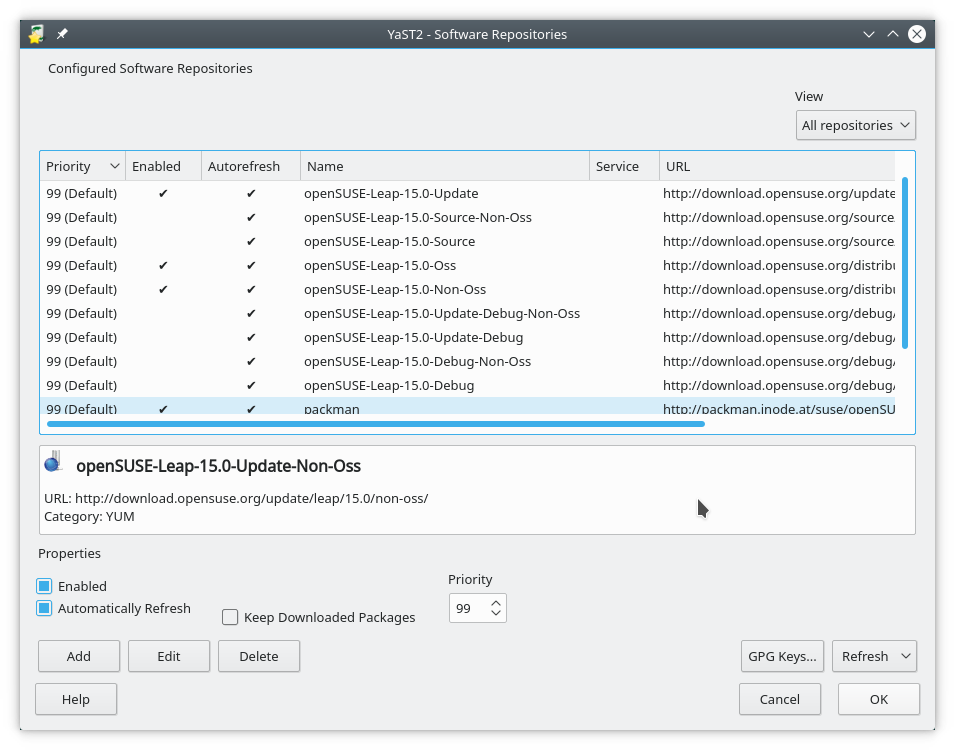
11.1.1 Adding Repositories
The official repositories are pre-configured, but many unofficial repositories exist and can be added too. |
Add repositories with care.
|
The easiest and safest way to add repositories is using the list of online community repositories in YaST. This provides you with a selection of popular and quite safe repositories to choose from:
YaST => Software => Software Repositories => Click on "Add" => Select "Community Repositories" and click "Next"
Note that the openSUSE BuildService is a service for the community to build and share packages. openSUSE BuildService repositories are unofficial and unsupported. Use at your own risk.
11.1.2 Recommended Repositories
You should always have the four official repositories (which are configured out of the box).- Main Repository (OSS)
- Main Repository (NON-OSS)
- Main Update Repository
- Main Update Repository (NON-OSS)
- Packman Repository
 |
Still missing a package? You can search for packages/repositories on the openSUSE BuildService here: http://software.opensuse.org/ |
11.1.3 Vendor Change Updates
Updating installed packages from one repository to versions from a different repository with a different vendor, is a little bit complicated. Read about it here:http://en.opensuse.org/SDB:Vendor_change_update
11.2 Repository Management in the Terminal
If you wish, you can manage your repositories via a terminal too.Add a repository with auto-refresh enabled zypper addrepo -f [URL] [Alias]. Example:
zypper addrepo -f http://ftp.gwdg.de/pub/linux/misc/packman/suse/openSUSE_Leap_15.5/ packman
Disable a repository zypper modifyrepo -d [URL|Alias]. Example:
zypper modifyrepo -d Packman
Remove a repository zypper removerepo [URL|Alias]. Example:
zypper removerepo http://ftp.gwdg.de/pub/linux/misc/packman/suse/openSUSE_Leap_15.5/
List configured repositories, showing details (priorities, URL, etc.):
zypper repos -d
See man zypper for more.
man zypper
Or for help on indvidual commands use for example:
zypper addrepo --help
 |
 |
Send your comments via e-mail to admin [at] opensuse-guide.org